How to use ERS

Your guide to using the Employment & Recruitment Service to hire and engage temporary workers.

ERS banner featuring Earnie and Hiring Managers

Linked icons

How to use ERS

Your guide to using the Employment & Recruitment Service to hire and engage temporary workers.

Lancaster University campus

Our scope

The Employment & Recruitment Service (ERS) is here to provide a professional recruitment service to the University for all temporary and casual roles, excluding teaching or research positions.

We cover:

  • Temporary fixed hours positions for up to 12 weeks in duration
  • Casual roles with ad-hoc hours on a longer term basis
  • One off event staff

For the definitions of casual roles and casual workers, please see our When to use ERS page. 

New hiring managers

If you have not requested a vacancy or authorised timesheets with ERS before, you will need to request a profile by emailing us. We will create your account and email you instructions on how to use our platform.

Email ERS

Getting Approval for your ERS Request

As of week commencing 22nd November 2021 the University introduced new vacancy control processes.

For all ERS requests (Advertisements, Named Appointments and Extensions), business cases no longer require approval from your HR Business Partner or HR Advisor. After you complete the business case template and gain consent from your Head of Department, you can then progress your request via the ERS Hiring Manager Portal.

Please get in touch with us on 01524 510853 or recruit@lancaster.ac.uk if you have any questions. We appreciate your support in ensuring this process is followed.


Pay

Pay

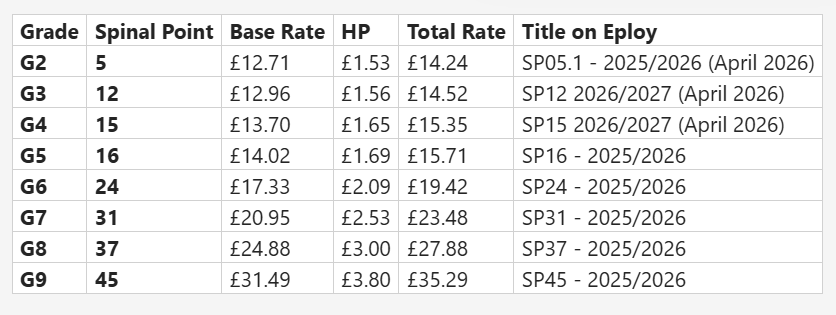
We encourage hiring managers to pay temporary workers according to the University’s spinal point list and to pay the National Living Wage as a minimum to support the student economy. Holiday pay is calculated at 12.07% of the hourly rate. Please note that day rates and fixed fees are not permitted.

If there is a permanent equivalent of a role within the department, the pay rate should be similar for the temporary or casual role where experience levels and differences in responsibility are comparable. If you are not certain what a suitable pay rate is for a position, contact HR at hr@lancaster.ac.uk

From 12th September 2023 all new ERS requests that are to be paid as part of the University Grading structure must be paid on the first Spinal Point of the Grade, as demonstrated on the Spinal Points table below.

Please download the University's spinal points table for your reference.

Download

Please download the 2026 Paydates schedule

Download

Submitting Your Request to ERS

Once your business case has been approved by your Budget Holder or Head of Department, please submit this request to us through our ERS Hiring Manager Portal.

Requisition form

Contact Us

Get in touch with our team – we're here to help you every step of the way!

Phone: 01524 510853 from Monday to Friday 10am-4pm.

Email: recruit@lancaster.ac.uk at any time.

Visit us in the Student Services Hub! Our Service Desk is open for Drop-ins from 11am - 1pm, Every Tuesday, Thursday and Friday